A Smartphone Controlled by Mind and Gaze
How I combined gaze tracking, EEG signals, and artificial intelligence in an ecosystem that controls a smartphone without touching the screen.
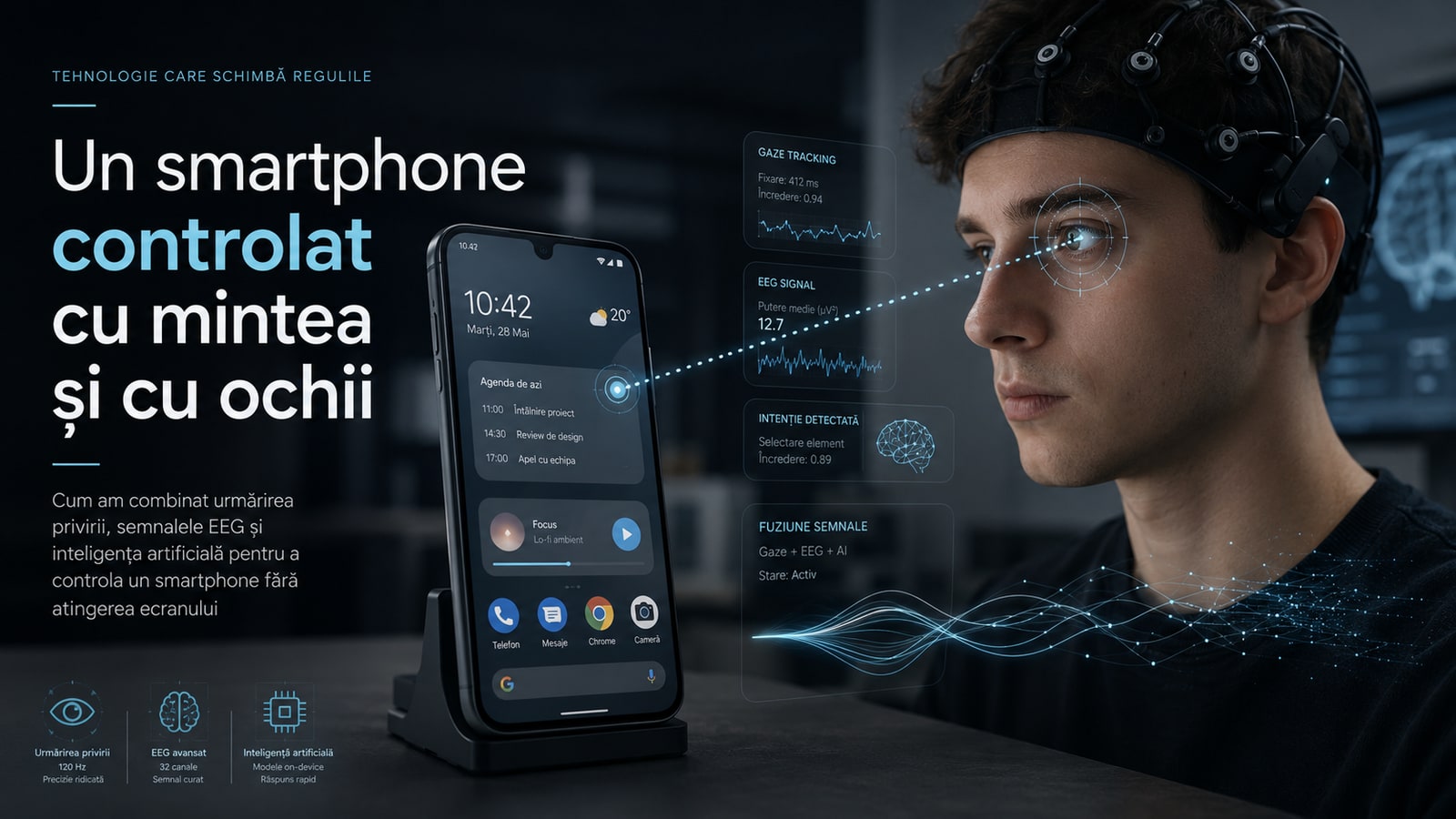
When I chose the subject of my bachelor's thesis, I did not want to build a simple project created only to graduate.
I wanted to start from a real problem and develop a solution that would work beyond a PowerPoint presentation or an isolated experimental environment.
The question I started with seemed simple:
Can someone control a smartphone without touching the screen, using only their gaze and brain activity?
One year later, the answer had become a working ecosystem made up of artificial intelligence, computer vision, EEG signals, on-device processing, a real-time backend, and native Android accessibility services.
My thesis was titled “Hybrid Retinal-Tracking and Neural Command Interface for Assistive Mobile Interaction.”
With the help of my good friend and research collaborator, Marius Drăgoi Valentin, the thesis became the foundation of an international scientific paper published in MDPI Biomimetics, a Q1 journal: “Bio-Inspired Gaze and Neural Command Fusion for Assistive Smartphone Interaction.”
For me, this project was not just a research paper. It was a full year of development, optimization, testing, and rebuilding.
I developed the system's entire engineering layer: the software architecture, Android applications, gaze processing, BCI integration, real-time communications, data infrastructure, and the mechanisms that transform user intent into an action actually executed on the phone.
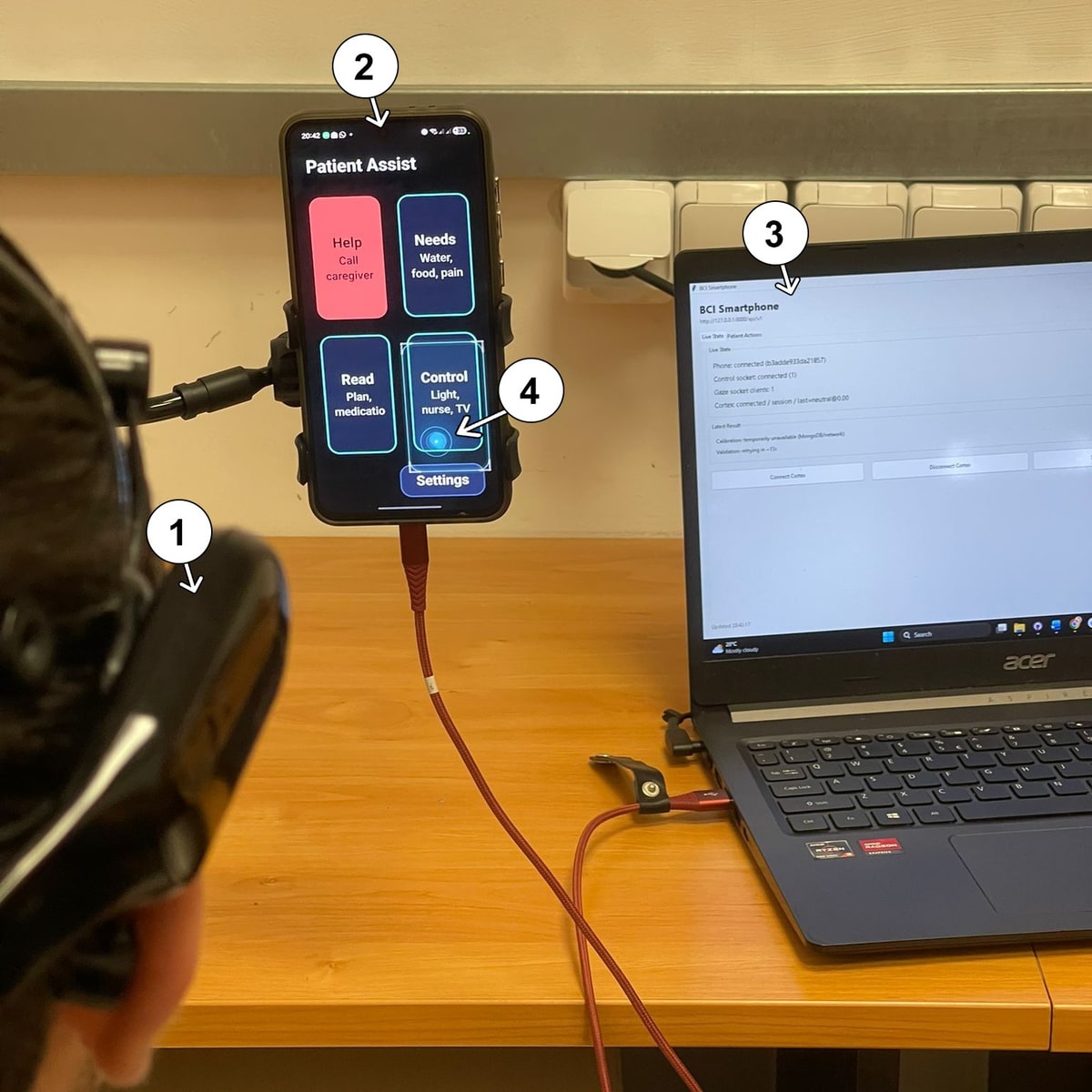
Why gaze alone is not enough to control a phone
Smartphones are built around touch interaction.
We tap buttons, swipe, scroll through pages, and return to the previous screen with our fingers. For most people, these gestures have become almost automatic.
For someone with severely reduced mobility, the same interaction may be difficult or impossible.
Gaze tracking is one of the most promising alternatives. A phone can estimate the area a user is looking at and use that position to select an element.
The problem appears when the system must decide whether the user is merely looking at a button or truly intends to activate it.
We constantly use our gaze to explore. We read, analyze, and rapidly change our point of interest. If every pause of the gaze automatically produced a click, the interface would execute many unwanted actions.
This difficulty is known as the Midas Touch Problem.
To reduce it, I split the interaction into two independent components:
- gaze tracking determines where the interaction takes place;
- the neural interface determines which command should be executed.
The user looks at an on-screen element and concentrates on one of the three supported actions:
- click;
- scroll;
- back.
Gaze selects the relevant area, while the EEG signal confirms the intention and the type of action. This fusion is the foundation of the entire system.
Modeling user intent
At a point in time t, the gaze-tracking component estimates the point being observed:
where x_t and y_t are the estimated screen coordinates.
In parallel, the BCI component produces a neural command:
The value \varnothing represents a situation in which the system does not identify an intention clear enough to execute an action.
The final command can be described by the fusion function:
where:
- g_t is the gaze position;
- b_t is the neural command;
- s_t is the current state of the Android interface;
- C_t is the final action executed by the system.
The phone does not react to coordinates alone, nor does it react only to the brain signal. The action is produced by combining visual context, neural intent, and the structure of the active interface.
An AI model running directly on the smartphone
To estimate gaze, I developed and optimized a computer-vision pipeline that runs directly on the phone.
The front-facing camera captures the user, and the system extracts the information required to locate the face, the eyes, and the relevant features for estimating gaze direction.
The artificial-intelligence model is optimized for mobile inference and integrated directly into the Android application.
This decision had two important objectives: reducing latency and protecting user data.
On-device processing and privacy
Frames captured by the front-facing camera do not have to be sent to an external server for processing.
The image is analyzed directly on the device, and the result used by the system is a numerical gaze estimate.
This architecture reduces the exposure of sensitive visual data and removes the dependency on a cloud service for every prediction.
In a system that continuously analyzes a user's face and eyes, local processing is not merely a performance optimization. It is an important security and privacy decision.
Low latency
In an assistive interface, the time between intention and execution must be as short as possible. Every delay adds up:
where:
- T_{\text{camera}} is the capture time;
- T_{\text{gaze}} is the time required to estimate gaze;
- T_{\text{BCI}} is the time required to confirm the neural command;
- T_{\text{network}} is the communication latency;
- T_{\text{Android}} is the time required to execute the action.
By running the visual component directly on the phone, I eliminated the transfer of images to a backend and removed one of the pipeline's most expensive stages.
Individual gaze calibration
The model's raw output cannot be used directly as a screen position.
Every user has different facial geometry. The phone's position, distance from the camera, head angle, and lighting can all change the relationship between the model's prediction and the observed point.
For this reason, the system includes an individual calibration process.
The user looks at a series of points displayed at known screen positions. Several predictions are collected for each point, and the system learns the transformation between the model's raw space and the real screen coordinates.
The transformation can be expressed as:
where:
- z is the model's raw prediction;
- \phi(z) is a polynomial feature expansion;
- W is the matrix of calibration coefficients;
- \hat{g} is the final estimated screen position.
The coefficients are obtained through Ridge Regression:
The first term minimizes the difference between the calibrated predictions and the real points.
The regularization term penalizes very large coefficients and reduces the risk of building an unstable transformation.
After calibration, the system checks whether the resulting error falls within accepted limits. The profile is saved only when the calibration passes the validation criteria.
Stabilizing the gaze estimate
The predictions of a gaze-tracking model can vary from one frame to the next, even when the user is looking at the same area.
Natural eye movements, camera noise, lighting, and small changes in head position all produce instability.
I used temporal filtering to stabilize the coordinates. Conceptually, the filtered position can be described by:
where:
- g_t is the current prediction;
- \tilde{g}_{t-1} is the previous filtered position;
- \alpha_t controls the balance between fast response and stability.
A filter that is too weak allows the cursor to oscillate. A filter that is too strong makes the interaction slow and creates the feeling that the system follows the gaze with a delay.
An important part of development was finding the right balance among accuracy, stability, and response time.
The neural component based on Emotiv Cortex
For neural commands, I used an Emotiv EEG headset and the infrastructure provided by the Emotiv Cortex API.
The headset measures variations in electrical brain activity through sensors positioned on the scalp.
The system does not read thoughts, sentences, or mental images.
The user goes through a training process in which they try to produce repeatable mental patterns. These patterns are associated with the available commands.
During use, the classifier estimates both the command and a confidence score:
where e_t represents the EEG information available at time t.
A command is accepted only if it meets several conditions:
where:
- \tau is the minimum confidence threshold;
- n_t is the number of consecutive detections;
- k is the minimum number required for confirmation;
- \Delta t is the time elapsed since the last command;
- T_c is the cooldown period.
These conditions reduce accidental commands and prevent repeated execution of the same action.
The real problem is not merely detecting a command. The system must detect the correct intention quickly enough and with the lowest possible risk of false activation.
The ecosystem architecture
The project is not a single application or an isolated AI model. It is an ecosystem of multiple components that communicate in real time.
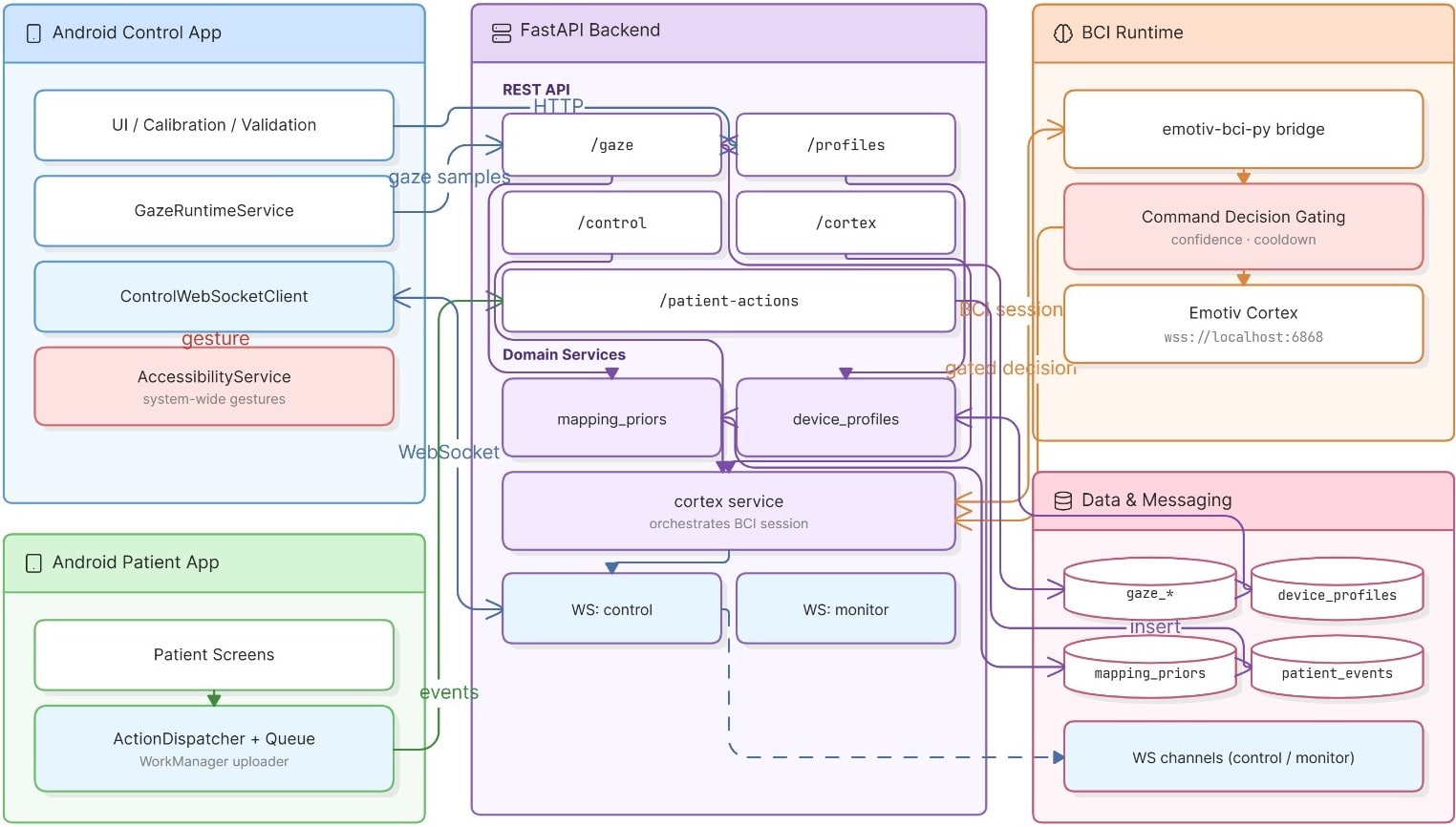
1. Python and FastAPI control backend
The main backend was developed in Python using FastAPI.
Python was also used for:
- developing the machine-learning logic;
- data processing;
- calibration experiments;
- model optimization;
- session analysis;
- Emotiv Cortex integration;
- command coordination.
I used WebSocket for real-time communication between the BCI component and the phone.
When a neural command is confirmed, it is sent to the Android application, where it is combined with the current gaze position.
2. Native Android application
The main application was developed natively for Android. It manages:
- system configuration;
- authentication and user profiles;
- access to the front-facing camera;
- AI model execution;
- gaze calibration;
- prediction filtering;
- the WebSocket connection;
- incoming BCI commands;
- Accessibility Service integration;
- execution of actions on the device.
Choosing a native implementation gave me direct control over the camera, inference, operating-system services, and accessibility mechanisms.
3. Android Accessibility Service
After the gaze and neural command have been fused, the system must turn the intention into a real action.
For a click command, the accessibility service analyzes the active interface structure and searches for interactive elements near the observed coordinate.
The selection can be formulated as:
where:
- \mathcal{U} is the set of interactive elements;
- B_i represents the visual bounds of element u_i;
- \tilde{g}_t is the filtered gaze position;
- d is the distance between the observed point and the element;
- u^{*} is the selected element.
The system attempts to identify the Android component semantically and execute the action specific to it.
When an element cannot be identified semantically, the system can use a coordinate-based fallback.
Scroll and back commands use actions and gestures provided by Android services.
This approach makes it possible to control the interface without modifying each application individually.
4. MongoDB and telemetry
MongoDB is used for logging and collecting anonymized data.
The system can record information about:
- user sessions;
- calibration results;
- estimated coordinates;
- EEG commands;
- confidence scores;
- dispatched actions;
- Android acknowledgements;
- measured latencies;
- errors occurring in the pipeline.
Telemetry was essential during development.
When an action failed, its cause could be located in several components:
- gaze estimation;
- EEG classification;
- command filtering;
- the WebSocket connection;
- Android element identification;
- gesture execution;
- action acknowledgement.
Detailed logging allowed me to reconstruct the complete path of every command and identify the exact point where a problem occurred.
5. A dedicated usability-testing application
I separately developed a native Android application for evaluating the system.
Its UI and UX were designed specifically for interaction through gaze and neural commands.
The application contains controlled tasks for:
- selecting elements;
- navigating between screens;
- performing a scroll;
- executing the back command;
- measuring completion time;
- identifying incorrect selections;
- evaluating the user experience.
The goal was not simply to test each model separately. I wanted to evaluate the entire ecosystem, from the moment the user looks at an element to the acknowledgement of the action executed by Android.
One year of engineering development
In its final form, the architecture may look logical and orderly. The process that led to it was not linear.
There were hundreds of versions and thousands of tests.
I changed models, thresholds, filters, calibration flows, and communication methods.
I analyzed latency, unstable predictions, false commands, and situations in which components worked individually but failed to work correctly together.
A more complex model could produce better results, but it could not maintain the speed required on the phone.
A lower neural threshold increased the number of detected commands, but also the probability of false activations. A higher threshold reduced errors, but made the interaction more difficult.
More aggressive filtering stabilized the coordinates, but added delay.
Every improvement had to be analyzed at the level of the entire system.
The real challenge was not making each component work separately. It was creating an ecosystem in which every component worked together in real time.
Evaluation with 36 participants
The system was tested with 36 student participants.
Each session included:
- equipment setup;
- gaze-tracking calibration;
- BCI command training;
- neural-command verification;
- completion of tasks in the usability application;
- data collection;
- user-experience evaluation.
Of the 36 sessions, 33 calibrations were accepted.
The overall BCI command success rate was:
The click command achieved the highest success rate:
Correct gaze-based selection was:
The acknowledgement rate for actions executed by Android reached:
The average usability score was:
These results demonstrate that the architecture is feasible.
A user can visually select an area, produce a neural command, and the smartphone can transform the two inputs into a concrete action.
What the project demonstrates
The system demonstrates that gaze tracking and Brain-Computer Interfaces should not be treated as two separate technologies.
Gaze is very effective for localization, but ambiguous when it comes to intention.
The EEG signal can confirm intention, but on its own it does not provide a precise and natural way to choose an on-screen element.
Combined, the two technologies compensate for each other's limitations.
This is the central idea of the project:
The result is neither just an eye-controlled cursor nor merely an EEG classifier.
It is a multimodal interface in which user intent is understood through several sources of information.
What the system is not yet
The project is a functional research prototype and an advanced proof of concept.
It is not yet a medical device and does not represent a clinically validated solution.
The study participants were students without severe motor disabilities, and the tests were conducted in a controlled environment.
The experimental interface was designed specifically for system evaluation, using sufficiently large elements and predictable flows.
Use in complex commercial applications—with small elements, animations, advertisements, and dynamic structures—introduces additional difficulties.
The time required to train BCI commands must be reduced.
Gaze-tracking accuracy must be improved for everyday conditions.
The system must also be evaluated with people who have real assistive needs.
These limitations do not diminish the project's value. They define the next stage of research and development.
What comes next
Future development directions include:
- increasing the accuracy of the gaze-tracking model;
- faster, adaptive calibration;
- reducing BCI training time;
- automatically personalizing neural thresholds;
- more advanced multimodal fusion;
- reducing external infrastructure;
- support for more complex Android interfaces;
- detecting and preventing accidental activations;
- long-term testing;
- evaluation with users who have motor disabilities.
One important direction is the development of a mechanism that automatically adapts the system to each user.
Instead of fixed thresholds, a future version could estimate the probability of genuine intent from multiple signals:
where:
- p_{\text{EEG}} is the neural classifier's confidence;
- v_{\text{gaze}} represents gaze stability;
- d_{\text{target}} is the distance from the UI element;
- T_{\text{fixation}} is the fixation duration;
- s_t is the interface context.
In this way, the decision would no longer depend on a single threshold, but on a complete estimate of user intent.
More than a bachelor's thesis
At the beginning, the project was the idea for a bachelor's thesis.
After one year of research and development, it became a functional software ecosystem and the foundation of an international scientific paper.
For me, this experience demonstrated that a bachelor's thesis does not have to be merely a document required for graduation.
It can be the beginning of a real research direction.
It can produce a system that works.
It can combine artificial intelligence, software development, and human-computer interaction in a solution built for a problem that matters.
I thank the colleagues and friends who helped me with testing, calibration, and feedback throughout development.
Some sessions were repeated several times. There were unstable versions, failed calibrations, and moments when the entire pipeline had to be reconsidered.
Every test, however, brought the system closer to its current form.
I especially thank Marius Drăgoi Valentin for the research collaboration and for his contribution to transforming the thesis into an international scientific paper.
A smartphone controlled without touching the screen
I started with the question of whether a smartphone could be controlled using gaze and brain signals.
To find an answer, I built:
- an AI model that runs directly on the phone;
- an individual calibration system;
- an EEG-based BCI component;
- a real-time control backend;
- a native Android application;
- an accessibility service;
- a telemetry infrastructure;
- a dedicated testing application;
- an experimental protocol applied to 36 participants.
The result is a system in which gaze identifies the interaction area, the neural signal confirms the action, and Android executes it.
This is not merely an experiment about pressing a button in a different way.
It demonstrates how computer vision, Brain-Computer Interfaces, and artificial intelligence can create a new link between a user and a device.
A smartphone controlled by mind and gaze.
Read the complete scientific paper: Bio-Inspired Gaze and Neural Command Fusion for Assistive Smartphone Interaction — ResearchGate.
Want a website that truly represents you?
Tell us briefly about your business and get an honest recommendation: which approach makes sense, at what budget, and what results to expect.